
This is the documentation for the QLS WooCommerce pickup points plugin. If you’d also like to offer other delivery methods besides pickup points, such as evening or same-day delivery from QLS, take a look at our WooCommerce checkout documentation.
The QLS WooCommerce pickup points plugin is currently only available for the Classic Checkout in WooCommerce.
Introduction
In this document, you’ll learn how to install the pickup points plugin yourself. If you have any questions, please contact our IT support team at it-support@qls.nl.
For who?
This plugin is available for both QLS fulfilment customers and parcel service customers.
Requirements
- PHP 8.0 or higher
- WooCommerce integration V3 in my.QLS
- The QLS WooCommerce pickup points plugin
Download hier - An active WooCommerce integration in my.QLS
Installation
WooCommerce configuration
The QLS WooCommerce pickup points plugin is easy to set up. Follow the steps below in WooCommerce:
- Install and activate the QLS WooCommerce pickup points plugin.
- In WooCommerce, go to WooCommerce > Settings > Shipping > Shipping zones and click Add shipping zone.
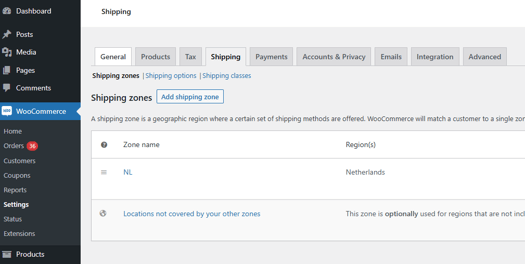
- Enter a recognizable Zone name.
- Enter your desired Zone regions.
- Click Add shipping method and select Pickup at service point.
- In your added shipping method, click Edit and enter your company_id from your company in my.QLS
If you don’t know your company_id, read here how to easily find your company_id.
The QLS WooCommerce pickup points plugin is now ready to use.