
With GoParcel Plus, you can have shipping boxes printed with your own design, ensuring that every order is shipped in your brand's style. This feature is currently available to fulfilment customers at location FC1 - Kerkeplaat.
Within GoParcel, you can easily create a design, add personalization, and request approval. Once the design has been approved, it will be applied directly to your upcoming shipments.
Getting Started
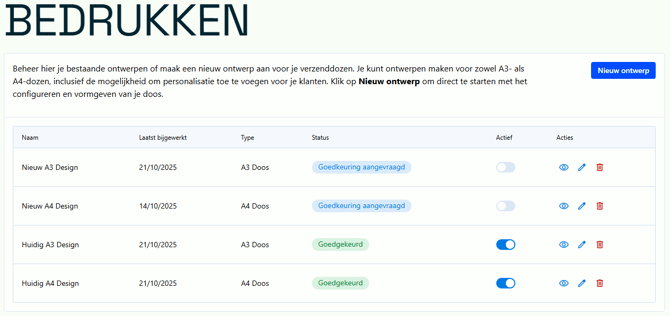
Click the Print button to access an overview of your designs. Here, you can edit or delete existing designs, or easily create a new one.

Create a Design
With the design tool, you can easily create your own custom-printed shipping box. Upload your design, add personalization for your customers, and then request approval to have your design printed. Follow the steps below to fully configure your design.
Download our templates here:
Print Settings
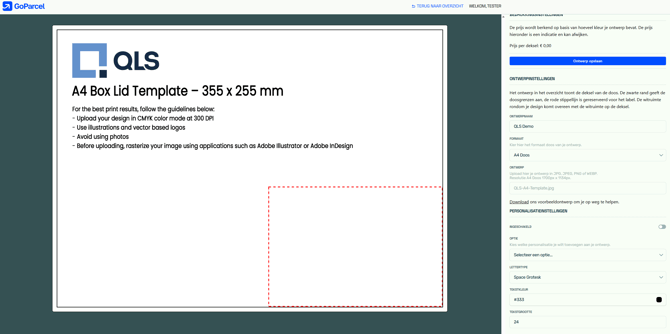
Here, you can determine how your design is saved, previewed, and approved.
-
Save Design – Save your current design settings so you can continue working on them later.
-
Live preview – Preview how your design will look on the box.
-
Request Approval – Submit your design for review. The design cannot be modified while approval is pending.
Design Settings
Here, you can enter the basic information and dimensions for your design.
-
Design Name – Choose a recognizable name for your design (e.g., “A3 Test” or “Winter Edition”).
-
Size – Select the box size to which your design will be applied (e.g., A3 Box or A4 Box).
-
Upload Design – Upload a file in JPG, JPEG, PNG, or WEBP format.
-
For A3 boxes, the dimensions are 400 × 300 mm.
-
For A4 boxes, the dimensions are 355 × 255 mm.
-
-
-
For the best printing results, use a high-resolution file at 300 dpi in CMYK color mode.
-
Personalization Settings
Personalization allows you to add variable elements, such as the customer's first name, to create a more personal experience.
-
Enabled – Turn personalization on or off.
-
Option – Choose which variable you want to add, such as First Name.
-
Font – Select the font used for personalization (e.g., Space Grotesk).
-
Text Color – Choose the color of the personalized text using the color picker or a hex code (e.g.,
#06a754). -
Text Size – Set the size of the personalized text. A higher value means larger text on the box.
Approval and Usage
Once you have created your design, you can request approval. Our team will be notified and review the design for technical accuracy and quality. The design cannot be modified while approval is pending. Once the design has been approved, it can be activated for production.
Pricing for Custom-Printed Boxes
The cost of printing boxes depends on the percentage of the surface area covered by the design. Below is an overview of the prices for each box size. The price of your box will also be displayed live after saving your design.
A4 Box
For A4 boxes, 25% of the surface area is reserved for the shipping label. The remaining 75% can be printed on.
-
Up to 25% coverage: €0.10 per box
-
Between 25% and 50% coverage: €0.20 per box
-
More than 50% coverage: €0.30 per box
A3 Box
For A3 boxes, 12.5% of the surface area is reserved for the shipping label. The remaining 87.5% can be printed on.
-
Up to 25% coverage: €0.20 per box
-
Between 25% and 50% coverage: €0.40 per box
-
More than 50% coverage: €0.60 per box